Skip to product information
1 of 1

Doubletrack

Doubletrack

Double-tracking effect

Free Software Plugin

Download for Windows
Download for MacOS

Doubletrack is our take on a real-time, double-tracking plugin, that mimics the sound of a real double-tracked guitar recording, without the need to record it twice.

Using a combination of phase-shifting filters, delays and pitch-shifting, the plugin generates a synthetic copy of the original recording, with subtly different pitch and timing. When the new track and the original are panned hard left and right, this creates a stereo-widening effect that comes very close to the effect of a real double-tracked guitar sound.

The plugin is FREE and requires no authentication or registration, so grab your copy!

View full details

Doubletrack User Guide

Controls

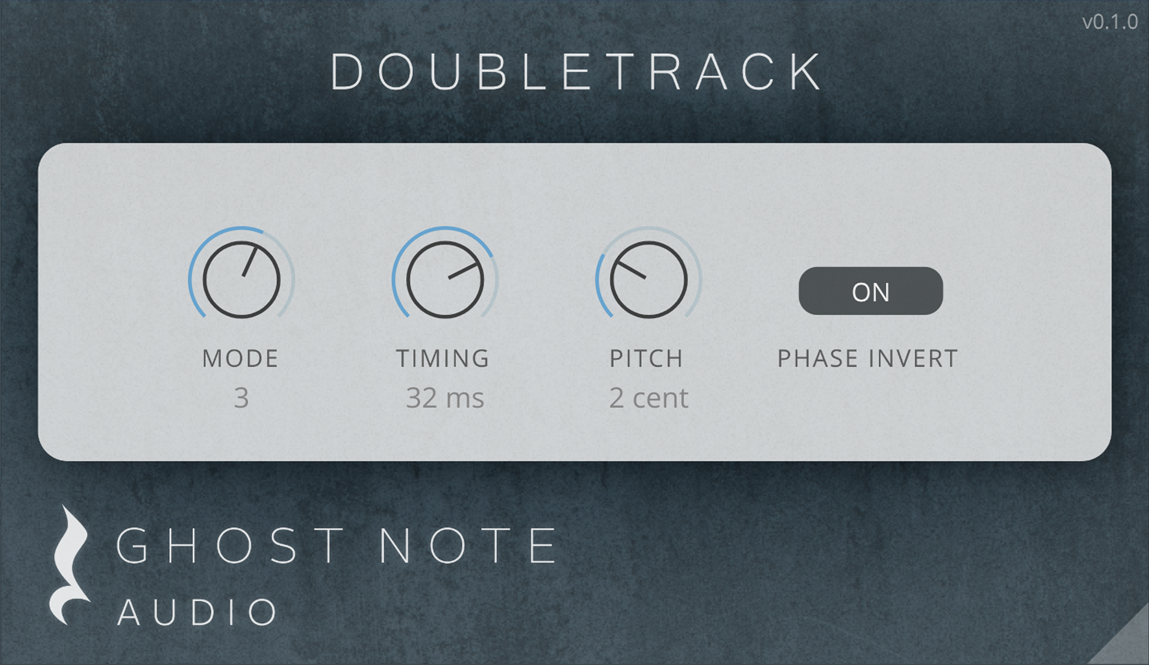
Mode

Chooses one of four different all-pass filter banks that shift the phase response of the signal, creating a subtle difference in the transients and timing of the sound.

Recommended default: 4

Timing

Applies a constant delay to the new track. Set low to maintain tight timing, or higher to give the recording a "looser" feel.

Recommended default: 10ms

Pitch

Applies a constantly varying pitch shift to the track.

Recommended default: 3 cent

Phase Invert

Inverts the phase of the resulting signal, further breaking up the stereo correlation and enhancing the stereo width.

Recommended default: On


Usage Tips

  • For best results, we recommend applying the effect on the DI track / clean guitar recording - before any amp simulation or distortion effects.
  • For best results, generate one "doubled" track, pan the original track hard left and the doubled track hard right.
  • A third track can be added and placed in the center of the mix. In this case, we recommend using a different Mode for the center track, as well as changing up the delay time and disabling phase inversion.
  • While you can experiment with quad-track generation, the plugin sees diminishing results when doing so, as phasing and chorusing artifacts start to become more pronounced with more than 2 tracks of the effect in use.


Software Specifications

Supported Operating Systems

  • Windows 10 or 11 with 64-bit processor.
  • MacOS 10.15 (Catalina) or later.

Supported Processors

  • PC: 64-bit processors with AVX support (all Intel and AMD processors after 2013)
  • Apple Native Silicon support (M1 and later).
  • Apple 64-bit Intel support.

Plugin Formats

  • VST - Windows and MacOS.
  • Audio Unit - MacOS only.

Additional Information

Installation Guide

Windows Installation Guide

When installing on Windows, you may receive warnings while installing the software.

Please ensure you have downloaded the software from our official website (ghostnoteaudio.uk). Do not use versions found on any other website!

Your browser may show a warning such as this. Please click the arrow and select “Keep”.

Chrome download warning dialog


You may also get warnings when running the installer. Please follow these pictures to allow installation

    Windows installation warning dialog

    MacOS Installation Guide

    Our MacOS installer is digitally signed and verified by Apple. It should not raise any warnings when launching.


    However, in some rare cases the operating system may warn you about installing software downloaded online. In order to get around this warning, please Control-click the .pkg installation file, choose Open With -> Installer app

    MacOS context menu to install software

    A warning popup might appear, please click Open.

    MacOS warning dialog about unverified software

    Your installer should open and you can follow the normal installation process from there.